
A Facial Analysis Machine can turn a brief consultation into a clearer, more visual conversation. It may display moisture levels, oil distribution, texture, pores, pigmentation, or fine lines. Yet a colorful screen does not automatically mean accurate science. The device matters, but the person using it matters just as much.
Choosing the right system requires more than comparing prices and camera resolution. Look for documented measurement methods, repeatable results, clear software reports, and training from a credible manufacturer. Ask how the machine handles different skin tones, lighting conditions, and changing room temperatures. Request demonstrations and sample reports before making a purchase. A reliable supplier should explain limitations, maintenance needs, data protection practices, and warranty coverage without vague promises. Check the calibration process. Small details matter.
The seven tips in this guide focus on practical decisions that affect daily use. They cover image quality, analysis functions, user experience, staff training, hygiene, privacy, and long-term support. Consider a busy clinic at 6 p.m., when a slow interface can disrupt every appointment. Consider a client who expects certainty from one scan. That expectation needs careful management. No device replaces professional observation, medical judgment, or appropriate referral. Some results can be influenced by makeup, recent skincare, dehydration, or poor lighting. I have seen technology impress people quickly, then create confusion when its reports were not explained well. A thoughtful purchase leaves room for verification, learning, and honest reassessment.
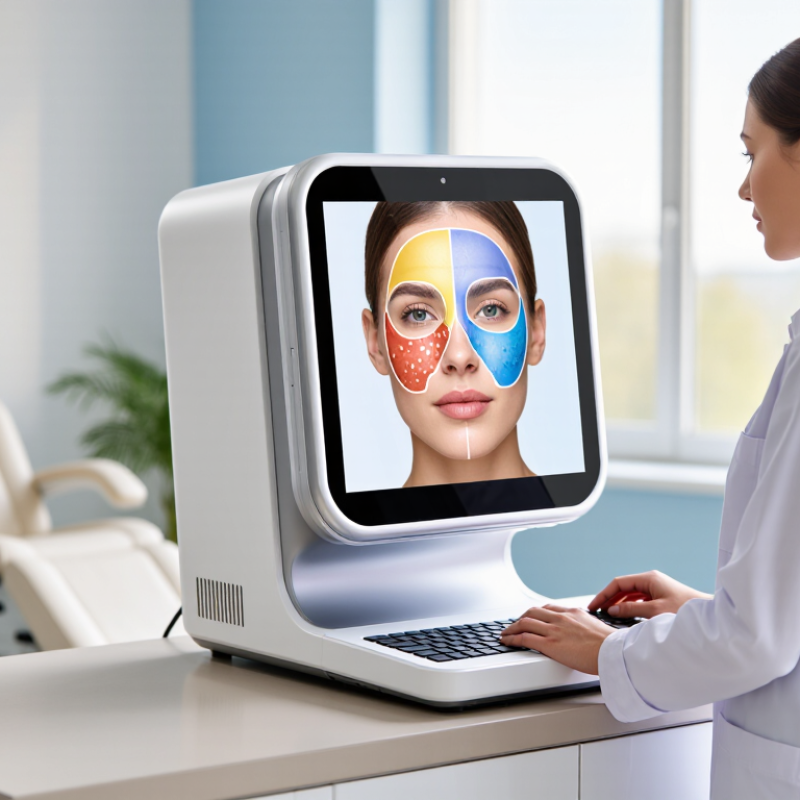
Before choosing a facial analysis machine, define the questions it must answer. A salon may need hydration, pore, texture, or redness assessments. A dermatology practice may require more controlled imaging and documented comparisons. These are different needs. Do not buy features you will rarely use.
Consider the people, space, and workflow involved. In a consultation room, bright windows can affect image consistency. A device should produce stable results under ordinary working conditions. Check its image resolution, lighting controls, software reports, and measurement methods. Ask whether staff can learn the system without lengthy technical training. Clear instructions matter.
Use the machine as a consultation aid, not an unquestionable authority. Facial conditions vary with sleep, temperature, cosmetics, and recent washing. Results should support professional observation and client discussion. They should not replace qualified medical assessment. Protect client images with controlled access and clear consent procedures. Privacy is part of responsible use.
I once assumed that more analysis categories meant better value. That was not always true. Extra data can confuse staff and clients when its meaning is unclear. Request a demonstration with realistic cases, including different skin tones and ages. Review sample reports carefully. Can you explain each result in plain language? If not, the machine may not suit your intended use yet.

A reliable facial analysis machine should show more than attractive skin images. Compare the imaging method first. Standard RGB cameras reveal tone, pores, and visible redness. Polarized light can reduce surface glare and expose uneven pigmentation. UV imaging may highlight sun-related changes, but results depend heavily on lighting and camera calibration. Three-dimensional imaging adds depth, useful for wrinkle and contour measurements. No camera is perfect.
Tip: Match the technology to the decision. For hydration, imaging alone is not enough. Consider devices that combine visual analysis with objective measurements, such as transepidermal water loss or skin temperature. The 2023 World Health Organization report states that skin conditions affect nearly 1.8 billion people worldwide. That scale makes consistent measurement important, not just attractive reporting.
Tip: Check how measurements are calculated. Ask for repeatability data, reference populations, and testing conditions. A 2021 review in Nature Medicine reported that artificial intelligence performance can vary across skin tones and clinical settings. This matters when a device produces one universal score. I would test the same face under controlled lighting, then repeat it after a few minutes. Small differences are normal. Large differences need investigation. Measurement ranges, calibration records, and trained operator guidance often matter more than a longer feature list.
| Tip | Selection Criterion | Imaging Technology to Consider | Typical Measurements or Outputs | Main Strength | Important Limitation |
|---|---|---|---|---|---|
| 1 | Match the system to the assessment goal Define whether the priority is appearance documentation, skin-condition screening, or facial-shape analysis. | Standard RGB photography, cross-polarized imaging, multispectral imaging, or 3D imaging | Visible pigmentation, redness, pores, wrinkles, texture, facial symmetry, surface contours, and treatment changes | Prevents paying for imaging modes that are not relevant to the intended workflow | A camera image is not a medical diagnosis; abnormal findings require qualified clinical evaluation |
| 2 | Check lighting and image consistency Choose a system that controls illumination, distance, head position, and facial expression. | Standardized RGB imaging with fixed lighting, positioning guides, and repeatable capture protocols | Comparable before-and-after images, color observations, visible lesion or blemish documentation, and treatment progress records | Improves repeatability and reduces changes caused by room lighting or camera angle | Skin color readings can vary with exposure, white balance, makeup, tanning, and ambient light if calibration is inadequate |
| 3 | Compare surface-detail technologies Use more than ordinary photography when texture and subsurface contrast are important. | Cross-polarized and parallel-polarized illumination | Reduced surface glare, improved visibility of redness and uneven pigmentation, and enhanced documentation of fine lines and texture | Polarization can separate surface reflection from some underlying color information | It does not directly measure collagen, hydration, or pigment concentration without validated algorithms and reference standards |
| 4 | Evaluate special-light capabilities carefully Confirm the wavelength range and the type of result produced. | UV or near-UV illumination, often approximately 365–400 nm, and multispectral imaging | Qualitative fluorescence patterns, apparent oil or surface buildup, pigment contrast, redness-related color channels, and spectral reflectance differences | May reveal contrasts that are less apparent in ordinary visible-light photographs | Results depend on wavelength, exposure, skin type, cosmetics, and software; fluorescence images should not be treated as definitive disease detection |
| 5 | Review 3D measurement specifications Choose 3D capture when facial proportions, symmetry, or contour changes must be quantified. | Structured-light or stereoscopic 3D imaging | Facial width and height, landmark distances, angles, symmetry, contour maps, surface area, and relative volume changes | Provides geometric data that a flat photograph cannot reliably provide | Accuracy is affected by movement, hair, reflective surfaces, facial expression, calibration, and the stated depth or spatial resolution |
| 6 | Separate measured values from estimated scores Ask which outputs are directly captured and which are calculated by software. | Image-analysis software using calibrated color, segmentation, landmark detection, and algorithmic scoring | Pixel-based area or intensity, wrinkle or pore counts, redness or pigmentation indices, age-related estimates, and composite skin scores | Automates reporting and can support consistent comparisons when the same protocol is repeated | Scores are model-dependent and may not be comparable between systems; request validation data, reference populations, and error ranges |
| 7 | Verify workflow, safety, and data controls Test whether the machine fits daily use and protects client information. | Integrated imaging platform with calibration checks, secure storage, export functions, and documented operating procedures | Capture time, repeat scans, report generation, image export, audit history, user permissions, and data-retention settings | Supports efficient, standardized use while improving traceability and privacy management | UV or intense light requires appropriate operating precautions; software should be reviewed for privacy, consent, access control, and backup practices |
Note: Measurement ranges, accuracy, and available imaging modes vary by system design and validation method. Always review the technical specification, calibration procedure, repeatability data, and intended-use documentation before purchase.
Choosing a facial analysis machine requires more than comparing camera resolution. Accuracy should guide every decision. Ask how the system was tested across skin tones, ages, lighting conditions, and facial conditions. Request validation data, not impressive sample images. In a clinic, repeat the same scan after cleaning the lens and changing room lights. Results should remain reasonably consistent. They will not be perfect. That limitation deserves honest documentation. Check whether trained professionals reviewed the measurements and whether the system shows confidence levels.
Facial data is sensitive and needs careful protection. Confirm encryption during transfer and storage. Ask where data is hosted, who can access it, and how access is recorded. Strong systems support role-based permissions, consent records, retention controls, and secure deletion. Do not accept vague promises. Read the privacy settings yourself. A forgotten tablet or shared login can undermine expensive security. I would also test an account removal request before purchase. It may expose gaps that a sales demonstration hides.
Software features should improve decisions, not create extra screens. Look for clear trend reports, side-by-side comparisons, customizable notes, export controls, and simple workflows. Updates should explain what changed and whether results remain comparable. Integration with existing records can save time, but compatibility claims need practical testing. Ask staff to complete a typical consultation using the trial system. Watch for confusing labels, slow loading, or automatic recommendations without context. My own first impression has sometimes been wrong. Record unresolved questions before signing a purchase agreement.
A facial analysis machine should fit the treatment room, not dominate it.
During a hands-on trial, check whether staff can capture a clear image in under two minutes. The screen should guide positioning, lighting, and retakes without confusing menus. Small details matter. Test the device with different skin tones, glasses, hairstyles, and ordinary room lighting. I once underestimated glare from a nearby window; the results became difficult to compare. That mistake changed my checklist.
Training requirements deserve the same attention as image quality.
Ask for documented onboarding, refresher lessons, troubleshooting guidance, and an accountable technical contact. A reliable supplier should explain how the system produces scores and where human judgment remains necessary. Operators should practice consent procedures, secure logins, data storage, and report interpretation. A certificate alone is not enough. Observe a real workflow, then let a new operator repeat it without coaching. If results vary widely, investigate training before blaming the equipment.
Compatibility can determine whether a promising tool becomes a daily burden.
Confirm support for your operating system, network settings, display resolution, and existing consultation software. Check export formats and whether reports retain original images, timestamps, and operator notes. Ask about updates, service intervals, replacement parts, and offline operation during internet interruptions. Protect client information. Use written policies for access, retention, and deletion, based on applicable privacy requirements. I would also request a short pilot with typical clients before purchasing. A polished demonstration can hide practical friction.
7 Tips for Choosing a Facial Analysis Machine
Tip 1: Calculate the complete cost, not only the purchase price. Include installation, calibration, software subscriptions, consumables, staff training, and replacement sensors. A cheaper machine may become expensive after twelve months. Ask for a written three-year cost estimate. Check whether updates are included or charged separately.
Tip 2: Examine support services before signing an agreement. Reliable suppliers should provide clear response times, remote troubleshooting, user training, and maintenance guidance. Ask who handles technical problems after installation. Try contacting support with a practical question. Slow or vague replies are warning signs. Support quality can affect daily appointments more than image resolution.
Tip 3: Judge long-term value through workflow and evidence. The machine should produce consistent images under different lighting conditions. Request independent testing data, calibration instructions, and user feedback from similar clinics. It should support qualified professionals, not replace their judgment or create unsupported diagnoses. Protect client data through access controls and secure storage. No forecast is perfect. Staff adoption may also be weaker than expected, especially when training is rushed. Plan review meetings after thirty, ninety, and one hundred eighty days. Measure appointment time, repeat scans, maintenance issues, and client understanding. A useful device must remain accurate, supported, and practical after the initial excitement fades.
Assess Costs, Support Services, and Long-Term Value
This planning model assigns a practical comparison weight to the seven factors buyers commonly review. Total cost includes acquisition, maintenance, software, and training expenses, while support and upgradeability help protect long-term value. Use these weights as a starting point and adjust them to match your clinic’s workflow, budget, privacy requirements, and service expectations.